
Download GIMP Portable – image editor, photo editing, free image editor, GIMP, portable image editor, photo retouching, image manipulation, graphics tool, photo editing software, image enhancement
Overview
GIMP Portable is a lightweight, free image editing solution designed for users who need professional-grade tools without installation or permanent setup. As a portable version of the widely recognized GNU Image Manipulation Program, it enables seamless access to advanced image editing capabilities from any Windows-compatible device. The app is ideal for photographers, graphic designers, and hobbyists who frequently work across multiple computers or require a temporary editing environment. Its primary purpose is to deliver full-featured image manipulation in a compact, transportable format—making it especially valuable for users who travel or work in shared computing environments.
The developer, GIMP Portable, did not provide additional technical or organizational background. However, the app’s roots trace back to the open-source GIMP project, known for its robust functionality and community-driven development. Real-world use cases include quick photo retouching, image resizing for web use, layer-based design work, and collaborative editing across different machines. In the broader app ecosystem, GIMP Portable fills a niche for users seeking a powerful, free alternative to commercial software like Adobe Photoshop, without the need for licensing or system installation. Its portability enhances accessibility and workflow flexibility, particularly in educational, freelance, or remote work settings.
Key Features & Functionality
- Free and Versatile Image Editing – GIMP Portable offers a full suite of tools for both basic and advanced image manipulation, including selection, cropping, color correction, and layer management. It supports non-destructive editing and advanced compositing, making it suitable for professional-quality projects.
- Portable Operation – Designed to run directly from a USB drive or external storage, the app leaves no trace on the host system. This allows users to edit images on any Windows PC without installation or configuration.
- Customizable Interface – Users can rearrange toolboxes, panels, and workspaces to match their preferred workflow. The interface supports multiple layouts and can be adapted to different editing styles.
- Plugin and Add-on Support – The app supports a range of third-party plugins and scripts, enabling extended functionality such as batch processing, advanced filters, and automation of repetitive tasks.
- Comprehensive Editing Tools – Features include brush tools, clone and healing tools, path and vector creation, text editing, and support for multiple file formats including PNG, JPEG, PSD, and TIFF.
For example, a freelance designer can use GIMP Portable to adjust client photos on a public computer during a business trip, or a student can complete a digital art assignment using a lab machine without installing software. The app’s ability to preserve custom settings and workflows across devices ensures continuity and efficiency.
Interface, UX & Performance
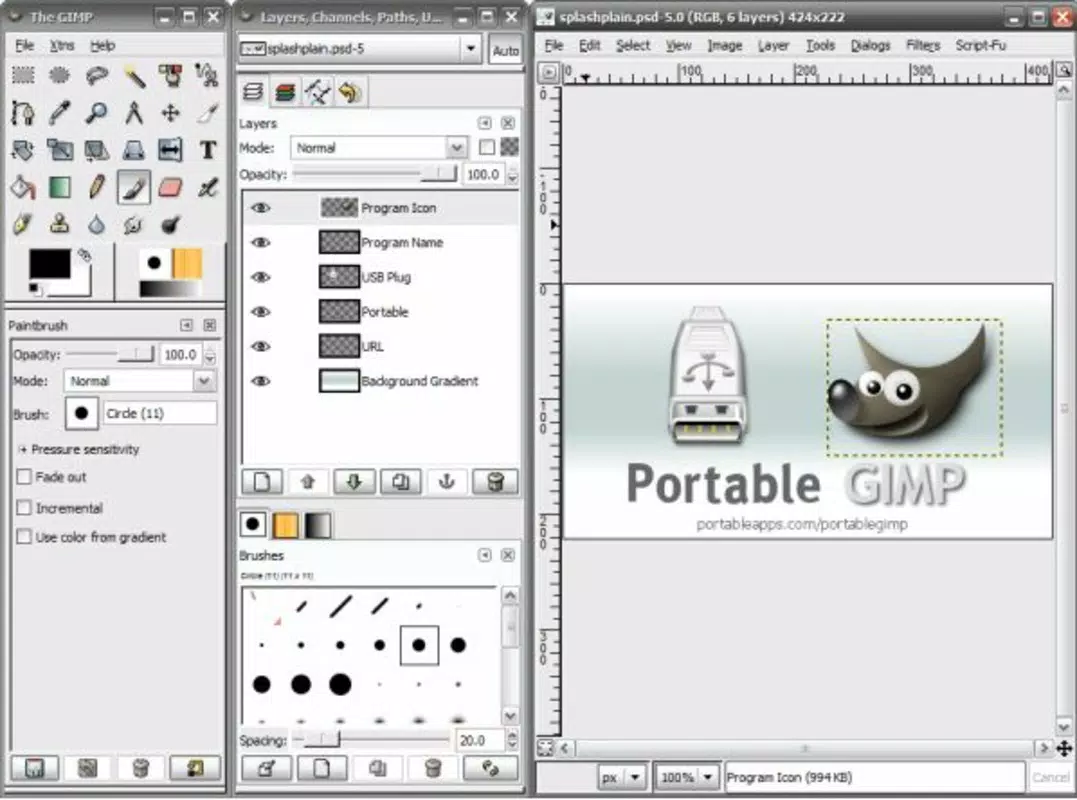
The user interface of GIMP Portable follows a traditional desktop application layout with dockable toolboxes, layers panels, and image previews. The visual style is functional and minimal, prioritizing accessibility over aesthetic flair. Navigation is consistent with standard Windows conventions, allowing users familiar with desktop software to adapt quickly. Menus and toolbars are logically grouped, and context-sensitive options appear based on the selected tool.
Although the developer did not list formal performance metrics, the app’s lightweight footprint of 12 MB suggests efficient memory usage and fast startup times. It is expected to run smoothly on most modern Windows systems, including low-end or older hardware. Responsiveness is maintained during routine editing tasks such as resizing, filtering, and layer adjustments. Stability is generally reliable for standard workflows, though complex projects involving large files or numerous layers may require sufficient system resources. The absence of installation reduces the risk of conflicts with existing software, contributing to a stable user experience across different environments.
Platform Compatibility & Technical Requirements
GIMP Portable is designed for the Windows operating system. The current version is 2.10.32, with a file size of 12 MB. This compact size enables easy storage and quick transfer between devices.
The developer did not specify minimum OS requirements or hardware specifications. However, given its lightweight nature, it is likely compatible with Windows 7 and later versions, including Windows 10 and Windows 11. No additional dependencies or background services are required for operation.
Users should ensure their system supports running portable applications from removable drives. Compatibility with different hardware configurations was not fully disclosed, but the app’s low resource footprint suggests broad usability across various devices, including laptops, desktops, and public computers.
Pros and Cons
Pros
- Free to download and use with no licensing fees
- Runs directly from USB without installation
- Compact size (12 MB) ideal for portable storage
- Full-featured image editing tools comparable to paid software
- Supports plugins and customizable workflows
- Preserves user settings across devices
Cons
- Specific system requirements were not listed
- May lack optimized performance on very old or low-spec hardware
- Interface may feel less intuitive to absolute beginners
- No official mobile or cross-platform versions available
- Updates may require manual download from external sources
FAQ
Is GIMP Portable safe to use?
Yes, GIMP Portable is a legitimate, open-source application. As long as it is downloaded from a trusted source, it poses no security risk.
Can I use GIMP Portable on multiple computers?
Yes, the app is designed for portability. You can run it on any Windows computer from a USB drive without installation.
Does GIMP Portable support PSD files?
Yes, GIMP Portable supports importing and editing PSD files, making it compatible with Adobe Photoshop projects.
Is GIMP Portable updated regularly?
While the developer did not specify update frequency, the underlying GIMP project is actively maintained, and updates are periodically released.
Can I install plugins on GIMP Portable?
Yes, users can add third-party plugins and scripts to extend functionality, provided they are compatible with version 2.10.32.
Final Thoughts
GIMP Portable stands out as a powerful, free, and portable image editing solution that delivers professional capabilities without the need for installation. Its lightweight design, full feature set, and compatibility with a wide range of file formats make it a compelling tool for students, freelancers, and professionals who value flexibility and accessibility. The ability to carry your editing environment anywhere ensures uninterrupted workflow across different devices. While it lacks mobile support and detailed system requirements, its core strengths in portability and functionality remain unmatched among free image editors.
For anyone seeking a secure, efficient, and cost-free image editing tool that works on any Windows machine, GIMP Portable is an essential utility. Download GIMP Portable now.


